
The Technical Decision-Making Process Demonstrated by Junior
Dev, Backend ·The project I’m currently working on involves a pipeline that processes audio data in real time.
At first, I was developing without giving it much thought, using the existing “Spring Boot 3.4.4 & Java 17” environment set up on our servers. Since the server was built to meet specific functional requirements, I didn’t initially give much consideration to versioning, the environment, or optimization.
However, after hearing about additional plans for the project’s direction, I started to have some concerns.
Will performance hold up even if traffic spikes? Due to the architecture, we’ll be making a lot of calls to external network APIs. Won’t that cause excessive latency? We need to minimize errors—will we be able to manage the thread pool properly? To address these concerns, I’d like to share the “technical decision-making process” of a junior developer and explain how we implemented Virtual Threads.
1. Project Background and Problem Definition
1.1. Service Logic: A Series of I/O-Bound Operations
The service I am responsible for is a pipeline designed for multilingual conferences and meetings, and it follows the service flow described below.
STT (Speech-to-Text) → Translation API → TTS (Text-to-Speech) API → Publish results to Redis
With the exception of the Redis publish step, each stage relies entirely on external APIs, making this a typical I/O-bound task.
1.2. Potential Limitations of the Existing Environment (Java 17 & Platform Threads)
In the existing Java 17 environment, we used Platform Threads, which are mapped 1:1 to OS threads.
- While waiting for a response from an external API, the thread enters a blocking state.
- Although we judged that situations where concurrent requests would increase to that extent were rare, if concurrent requests were to surge, the “thread pool could be exhausted”, or increasing the number of threads could lead to a sharp rise in memory usage and context switching overhead.
1.3. Limitations of the Per-Channel Thread Allocation Approach
The service I developed features multiple language (Lang) channels for each conference.
To ensure sequential data processing and isolation between channels, we previously used a strategy where we created a single thread (Single Thread Executor) for each Key (conference ID + language code) and cached it, as shown below.
// AS-IS: Java 17 (Platform Thread)
// One heavy OS thread is created and left idle for each channel
public ExecutorService getExecutorForLangGroup(String conferenceId, String langCode) {
    String key = conferenceId + “:” + langCode;
    return langExecutors.computeIfAbsent(key, k ->
        Executors.newSingleThreadExecutor(r -> {
            Thread thread = new Thread(r);
            thread.setDaemon(true); // An OS thread is occupied per channel
            return thread;
        })
    );
}
While this approach may seem simple and straightforward, its drawbacks were clear.
- Scalability limitations: If there are 100 concurrent meetings, each supporting 10 languages, 1,000 OS threads are created in an instant.
- Resource waste: Even in quiet rooms with no conversation, threads remain idle while occupying resources, wasting memory. (Of course, we temporarily addressed this by continuously monitoring active language channels in the room, but this also incurs a cost.)
- Context Switching: As the number of active threads increases, the cost of the CPU switching between threads becomes greater than the cost of processing the work itself.
2. Seeking a Solution: Java 21 and Virtual Threads
The first approach we considered was reactive programming (WebFlux).
However, I abandoned the idea due to two concerns: “I’d have to rewrite the existing code” and “How would I handle other APIs?”
Then it occurred to me: “I heard there’s something called Virtual Thread in Java 21…”
I remember hearing that it was really lightweight? Fast? Anyway, good? So I decided to look into it right away.
3. What Is a Virtual Thread?
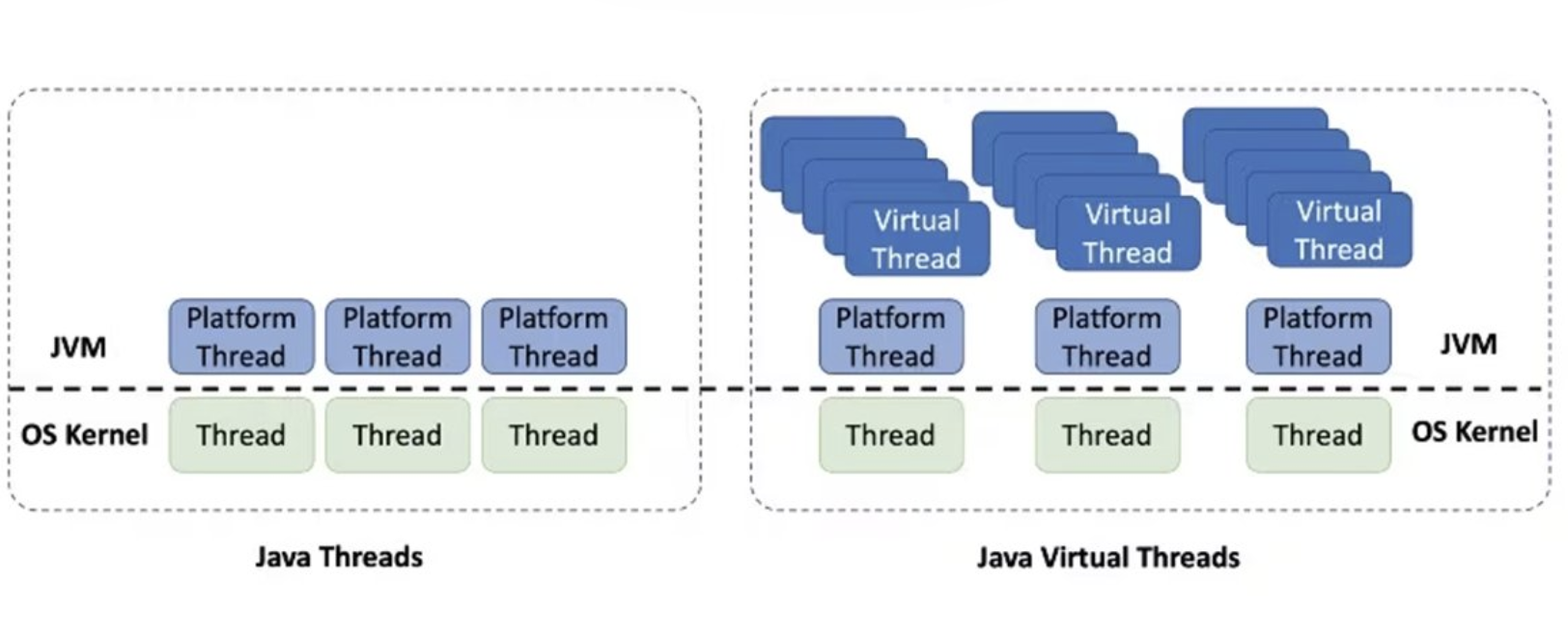
3.1. Basic Concepts
While a traditional Platform Thread is a heavyweight object that occupies a single OS thread, a Virtual Thread is a lightweight thread managed internally by the JVM.
- Platform Thread: 1:1 mapping with OS threads (expensive, limited in number)
- Virtual Thread: N:M mapping with OS threads (Carrier) (very inexpensive, millions can be created)
When I/O blocking occurs, a Virtual Thread yields its position to another Virtual Thread without occupying the actual OS thread (Carrier Thread). As a result, a small number of OS threads can handle a vast number of concurrent requests.
Since this scenario maximizes the benefits of Virtual Threads, there was no reason not to adopt them.
- Virtually no OS thread occupancy time, even when using blocking I/O as-is
- Since OS threads are released while waiting for API responses, many requests can be processed in parallel with minimal resources
Virtual Thread Reference: Oracle Official Documentation - Virtual Threads
4. Implementation Process
4.1. Java Version Upgrade
First, when upgrading from Java 17 to Java 21, Spring Boot 3.4.4 was supported, and fortunately, it worked perfectly.
All that was required was installing the JDK and updating the build.gradle configuration.
Of course, after this process, we reviewed the Spring Boot version and upgraded to 3.5.6. (The main reason being that it is an LTS version)
4.2. Applying Spring Boot Configuration
Many technical blogs mention that starting with Spring Boot 3.2, you can configure Tomcat and TaskExecutor to use Virtual Threads with a single option.
# application.yml
spring:
  threads:
    virtual:
      enabled: true
When I asked ChatGPT, it said it’s possible even without applying this configuration.
4.3. Logic Changes
I modified the previously used getExecutorForLangGroup() method. (See Section 1.3.)
// TO-BE: Java 21 (Virtual Thread)
public ExecutorService getExecutorForLangGroup(String conferenceId, String langCode) {
    String key = conferenceId + “:” + langCode;
    return langExecutors.computeIfAbsent(key, k ->
        // No longer pre-create physical threads.
        // Use a Virtual Thread Executor that is created on-the-fly for each incoming task
        Executors.newVirtualThreadPerTaskExecutor()
    );
}
5. Performance Measurement and Numerical Benefits
5.1. Theoretical Benefits of the Change
| Item | Existing (newSingleThreadExecutor) | After Change (newVirtualThreadPerTaskExecutor) |
|---|---|---|
| I/O Task Processing | Sequential blocking in a single thread | Parallel processing possible; platform threads unmounted during I/O wait |
| Throughput | Very low (dependent on a single slow operation) | Very high (most time utilized without I/O waiting) |
| System Latency | High (queue wait time occurs) | Low |
| Resource Efficiency | Inefficient (platform thread occupied) | Very efficient (uses lightweight virtual threads) |
5.2. Quantitative Benefits of the Change
I will conduct a simple test.
In a single meeting, I opened two language channels and checked the time it took to process sentences of the same length on each.
- As-Is (Platform Thread): 2.5s
- To-Be (Virtual Thread): 1.3s
We achieved a speed improvement of approximately 48%.
I’m embarrassed to admit I’ve never properly conducted a load test, so I’ll study up and try to perform a proper test in the future.
6. Potential Benefits Beyond Metrics
While the numerical performance improvement is significant, the potential benefit we could gain was development productivity.
- Code Simplicity: Without complex asynchronous code like
WebFluxor callback hell, the code behaves asynchronously even when written in the familiar synchronous (imperative) style. - Ease of Debugging: Since the stack trace remains unbroken and connected, tracking errors is much easier.
- Resource Efficiency: The time spent worrying about or tuning the thread pool size is gone.
7. Thoughts as a Junior Developer
I think many of you are probably in the same boat as me.
- To complete a feature as planned, I start with the design, but how should I design it for good scalability?
- How should I design the DB tables? Should I just add columns? Or create a mapping table?
- What do I need to do for parallel processing?
After going through these concerns, I produce the impressive result of “feature completion.”
But this time, I didn’t stop at “feature completion.”
After developing the feature, I focused on “resource conservation” and “performance improvement.”
- I considered potential threats and limitations of the current approach (such as situations where we might end up relying solely on
Platform Threads) - Determined “why” certain technologies should be chosen (clear rationale for adopting Java 21)
I decided to be wary of the mindset that “everyone else is doing it this way.” There needs to be a “reason” for adopting any technology stack. After all, the “why” is the driving force behind growth.
These days, I spend at least 30 minutes every two days reviewing the existing logic.
I look for ways to improve performance, check if design patterns can be applied to areas with duplication, or consider seemingly minor details—like whether to retrieve DB data from a Util class via Service logic or access it directly through a Mapper.
I believe that small habits like these will help me become a better version of myself in the future and grow into a great senior developer.